
What Is a Discord Soundboard?
A Discord soundboard is the built-in panel of clickable sounds in a voice channel — tap one and everyone on the call hears it. Servers come with a set of sound slots, and you can upload your own short clips so your crew has its own reactions on tap.
Discord added a native soundboard right inside voice channels: a small grid icon near your mic and camera controls opens a panel of sounds you can play for the whole channel. It's perfect for a quick airhorn on a clutch play or a "bruh" when someone whiffs. This page does two things — it's a fast meme soundboard you can play right now, and every sound can be downloaded as a clip to upload to your own Discord soundboard. Tap to hear 825+ sounds above, grab the ones you like, and add them to your server.
Sound has quietly become part of how a server has a personality. A shared set of reactions — the airhorn the regulars spam after a win, the "bruh" reserved for one specific friend — is an inside joke everyone can play on cue. A good Discord soundboard turns a voice channel from a place you talk into a place you hang out.
How to Add a Sound to Your Discord Soundboard (3 Steps)
Adding a custom sound takes under a minute. Here's the whole flow:
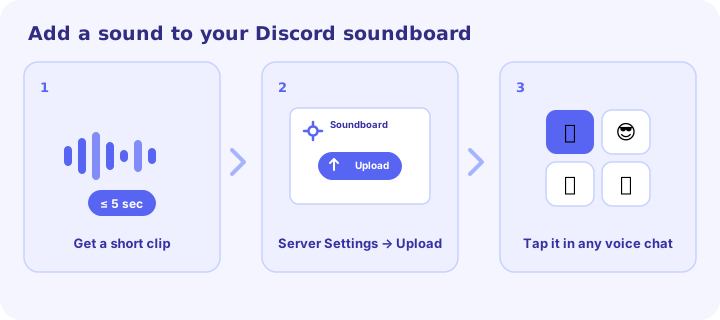
- Get a clip of 5 seconds or less. Download a sound from the board above (or trim a longer one in any editor) — Discord soundboard clips can't be longer than five seconds.
- Open Server Settings → Soundboard → Upload Sound. In the server, go to Server Settings, find Soundboard under Expression, and click Upload Sound. Uploading is done on desktop or in a browser.
- Name it, set a volume and emoji, save. Then open any voice channel, hit the soundboard icon, and tap your new sound to play it for everyone.
Discord Soundboard Limits You Should Know
A few rules trip people up. Keep these in mind before you start uploading:
- 5-second maximum. Every soundboard clip has to be five seconds or shorter — great for punchy meme sounds, not for full songs.
- Sound slots scale with boosts. A server starts with a set of slots that grows as it reaches higher Server Boost levels, up to 48 sounds at the top tier.
- Create Expressions permission. You can only upload if your role has it — admins control this per role.
- Nitro unlocks sounds everywhere. You don't need Nitro to use your own server's soundboard, but Nitro lets you play sounds from other servers in any server you're in.
- Upload on desktop or browser. You can play sounds on mobile, but adding new ones is done from the desktop app or a browser.
Native Discord Soundboard vs. a Soundboard App
If the 5-second limit or slot count feels tight, you can route audio through a soundboard app instead. Both approaches are valid — here's how they compare so you can pick the right one:
| Feature | Native Discord soundboard | Soundboard app |
|---|---|---|
| Setup | None — built into Discord | Install an app + route audio |
| Clip length | 5 seconds max | Any length |
| Number of sounds | Grows with Server Boost (up to 48) | Effectively unlimited |
| Who hears it | Everyone, played by Discord | Routed through your mic |
| Cost | Free | Free apps exist (some paid extras) |
| Best for | Quick shared reactions | Long clips, music, huge libraries |
For most people, the native soundboard is all they need — it's free, built in, and plays for everyone with zero setup. Reach for an app only when you genuinely need longer clips or a huge library. Either way, you can grab the meme sound effects you want right here.
How to Make Your Own Discord Soundboard Sounds
You're not limited to clips you find — half the fun of a server soundboard is custom sounds only your crew has. Making one just means getting any audio down to a clean clip of five seconds or less:
- Trim a longer sound. Drop an MP3 into a free editor like Audacity, an online MP3 trimmer, or your phone's audio app, cut it down to the punchy moment, and export.
- Record your own. Audacity can capture your mic or desktop audio, so an inside joke, a catchphrase, or a friend's worst quote can become a one-tap button.
- Keep it clean. Trim dead air off the start so the sound fires the instant it's tapped, and balance the volume so it isn't twice as loud as everyone's voices.
- Name it well. Give each sound a clear name and a fitting emoji — the soundboard panel is a grid, and a good emoji makes the right button easy to find mid-game.
Then upload it with the three steps above. Test it once in a voice channel before you rely on it, so you know the volume and timing land the way you want.
Best Meme Sounds for Discord
The short, punchy clips work best in a voice channel. These are the Discord soundboard staples:
- Vine Boom — the most versatile sound on Discord; a bass thump that punctuates any insult, reveal, or good play.
- Airhorn — celebrate a clutch win or hype the lobby. Use it sparingly so it keeps its punch.
- "Bruh" / "oof" — deadpan reactions when a teammate whiffs.
- Sad trombone (womp womp) — score a fail with maximum sympathy.
- "GG EZ" and gaming voice lines — classic post-match trolling for gaming servers.
- Record scratch — freeze a chaotic moment right before everything goes wrong, then let the silence do the work.
Want more? The funny soundboard has the full set of comedy reactions, and the meme sound effects library lists the named classics.
Play or Grab Sounds Right Here
The board at the top of this page is a full meme soundboard in its own right: tap any of 825+ sounds to play it instantly, no account and nothing to install. When you find one you want on your server, hit download to save the clip, trim it to five seconds if needed, and upload it with the steps above. Because everything plays in the browser, you can audition a dozen sounds in a few seconds and only download the ones that actually get a reaction — a lot faster than hunting through an app.
It also loads where a lot of soundboards don't. Because it's a single lightweight page, it opens on locked-down school and office networks — the same reason our meme soundboard unblocked page works on restricted Wi-Fi. Play here, build your Discord soundboard there.
Soundboard Etiquette: Don't Get Muted
A Discord soundboard is hilarious right up until it's annoying, and the gap between the two is timing. Servers can mute a member's sounds or switch the soundboard off entirely per role, so the fastest way to ruin the fun for everyone is to spam it. Read the room: a chaotic gaming lobby loves a wall of airhorns, while a chill study call wants one well-placed "bruh" at most.
The rule of thumb is the same as any comedy: one perfectly timed sound beats ten random ones. Save the airhorn for the actual clutch, let the conversation breathe between drops, and you'll be the person who makes the call funnier — not the reason an admin turns the soundboard off.
Frequently Asked Questions
How do I add a sound to my Discord soundboard?
Open Server Settings, go to Soundboard under Expression, and click Upload Sound — pick a clip of 5 seconds or less, name it, set a volume and emoji, and save. See the three-step guide above.
What's the Discord soundboard length limit?
Five seconds. Every soundboard clip has to be five seconds or shorter, so trim longer sounds before uploading.
Why can't I add sounds on mobile?
You can play soundboard sounds on mobile, but uploading new ones is done from the desktop app or a browser — and you need the Create Expressions permission on your role.
How many soundboard sounds can a server have?
A server starts with a base set of slots that grows with its Server Boost level, up to 48 sounds at the highest tier.
Do I need Nitro to use the soundboard?
No — you can use your own server's soundboard for free. Nitro lets you play sounds from other servers in any server you join.
Can I download these sounds for Discord?
Yes — every sound has a free one-click download. Trim it to 5 seconds if needed and upload it to your server's soundboard; see our terms for usage.
That's the whole loop: play here, download the clip, and upload it to your server. The best Discord soundboard is the one stocked with the sounds your crew actually reacts to. Browse categories or open your favorites to start.