

What Is a TikTok Soundboard?
A TikTok soundboard is a grid of one-tap buttons that play the short meme sounds and effects creators layer into TikTok videos — the bruh, the vine boom, the airhorn, the sad trombone, the brainrot voices. Instead of digging through a video to find a clip, you tap a button and the sound fires instantly, then download it as an MP3 for your edit. This page collects 825+ of those sounds in one fast, free board with nothing to install.
On TikTok, the sound is the trend. A single audio clip can define thousands of videos, and the editors who move fastest are the ones who already have the right sound ready to drop. That's exactly what a TikTok soundboard is for: it keeps the viral reactions, transitions, and meme audio one tap away, so you can grab a sound the moment a trend takes off instead of hunting for it. Type a word to filter the grid, hit Random for inspiration, and ♥ the sounds you reuse most.
Why Creators Use Sound Buttons for TikTok Edits
Great TikTok edits live on timing. A reaction sound a half-second late kills the joke, and a transition without a whoosh feels flat. A soundboard puts every cue one tap away, so you can audition sounds against your cut and grab the MP3 the instant it clicks.
Scrolling YouTube for a clean rip of a sound, then trimming it, then exporting it, is the slow way to edit. A TikTok soundboard collapses that into two clicks: preview the sound here, download the MP3, and drop it into CapCut, your video editor, or TikTok itself. Because every clip is pre-trimmed and volume matched, it's ready to sit in a timeline without extra cleanup. Reaction creators use it to react to posts in real time; editors use it to score transitions and punchlines; and trend-chasers use it to jump on a viral sound before the moment passes.
The speed pays off beyond short-form video, too. Streamers cue a sting live when chat lands a joke, podcasters drop a transition between segments, and meme-page admins batch-grab a week's worth of clips in one sitting. Because the board runs in any browser and the files download as plain MP3s, the same set of sounds slots into CapCut on a phone, Premiere on a laptop, or a stream deck on a desk — no app lock-in, no format wrangling. One library, every workflow.
The Sounds That Power TikTok Edits
Almost every TikTok edit leans on one of four sound families. Learn these and you'll always know which button to reach for:
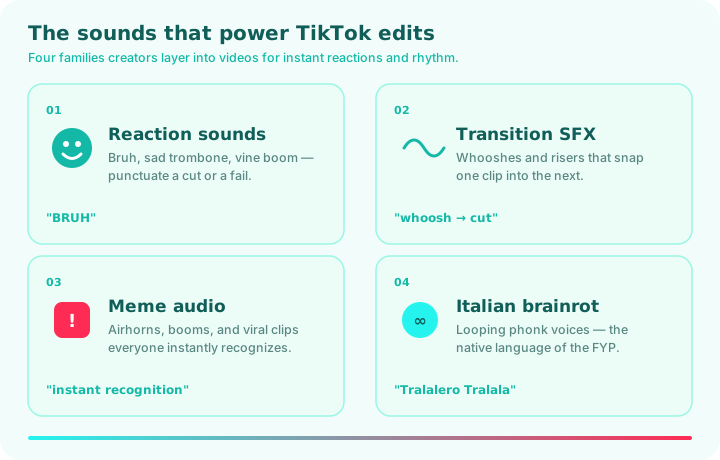
- Reaction sounds. The bruh, the vine boom, the sad trombone — short stings that punctuate a cut, a fail, or a punchline. The backbone of reaction TikToks.
- Transition SFX. Whooshes and risers that snap one clip into the next and give an edit its rhythm. Browse the meme sound effects board for the full set.
- Meme audio. Airhorns, booms, and viral clips everyone instantly recognizes — the sounds that make a video feel "in" on the joke.
- Italian brainrot. Looping phonk voices are practically the native language of the For You Page; grab them on the brainrot soundboard.
Trending TikTok Sound Types
"TikTok sounds" is a broad umbrella. Here's how the families map to the board above — jump straight to what your edit needs:
| Sound type | What it does in an edit | Where to find it |
|---|---|---|
| Reaction sounds | Punctuate a cut, fail, or punchline | The funny soundboard |
| Transition SFX | Snap between clips, add rhythm | The meme sound effects |
| Meme audio | Signal the joke everyone knows | The Memes category |
| Brainrot voices | Looping phonk chaos for the FYP | The brainrot soundboard |
| One-tap buttons | Fire any sound instantly while editing | The sound buttons board |
How to Use the TikTok Soundboard in 3 Steps
- Open the page. Nothing to install and no account — the TikTok soundboard is live the instant it loads.
- Tap a sound to preview it. It plays immediately in your browser. Tap another to compare and find the one that fits your edit.
- Download or save. Hit download for a high-quality MP3, or ♥ it to your favorites for next time.
How to Add These Sounds to a TikTok Video
Getting a sound from this board into a TikTok takes one short workflow. The cleanest route is to edit first: download the MP3 here, drop it onto your timeline in CapCut or another editor, line it up with the exact frame, then export the finished video and upload it to TikTok. Because the clips are pre-trimmed and volume-matched, they sit in a timeline cleanly without extra processing.
You can also add a sound as your own audio inside the TikTok app: record or upload your video, then add the downloaded clip as a sound layer. One honest note on rights — only the sounds you have permission to use should go into a monetized or branded post. Many of our sound effects are royalty-free, but viral meme clips can carry third-party rights, so check the source before you build a campaign around one. See our guide to using meme sounds in videos for the full routing walkthrough, and our terms for usage guidance.
Keeping Your TikTok Edits Fresh
Trends move fast, and a sound that defined the For You Page last month can feel stale this week. The editors who stay fresh treat a soundboard like a palette, not a crutch: they keep a small set of reliable reactions and transitions, then rotate in whatever sound is breaking right now. The goal isn't to use every clip you can find — it's to use the right one at the right beat.
A few habits keep your edits sharp. Match the sound to the cut — a whoosh sells a transition, a vine boom sells a reveal, and mixing them up reads as random. Don't over-layer: one well-placed effect beats five stacked on top of each other. And watch what's trending, but put your own spin on it — the edits that pop reuse a familiar sound in an unexpected way.
A Short History of TikTok Sounds
TikTok was built on sound from the start. Its predecessor, Musical.ly, was a lip-sync app — the audio came first and the video followed. When TikTok inherited that DNA, it made the sound, not the creator, the unit of virality: tap any clip's audio and you see every video that used it, which turns a single sound into a format thousands of people remix.
That's why meme sounds spread faster on TikTok than anywhere else. The vine boom found a second life as a reaction stinger, the bruh became universal shorthand, and entire genres — Italian brainrot, phonk edits, reaction cuts — are defined by their audio more than their visuals. A TikTok soundboard is the practical side of that culture: instead of waiting for a sound to surface in your editor's library, you grab it here, download it, and drop it into the edit while the trend is still hot. This page is built for exactly that — hundreds of the meme sounds and effects TikTok edits run on, all free and one tap away.
Frequently Asked Questions
What is a TikTok soundboard?
It's a grid of one-tap buttons that play the meme sounds and effects used in TikTok edits — reactions, transitions, brainrot, and viral clips — instantly in your browser, free to download as MP3.
Are these TikTok sounds free?
Yes — every sound is free to play and download, with no account, no subscription, and no hidden cost.
Can I use these sounds in my TikTok videos?
Yes — download the MP3 and add it in CapCut or as your own sound in the TikTok app. Many of our sound effects are royalty-free; for monetized or branded posts, check each clip's source rights first.
Does this include copyrighted songs?
No. This board focuses on meme sounds and sound effects for edits, not full music tracks. For songs, use TikTok's own licensed in-app music library.
Do I need to download anything or sign in?
No. The sounds play instantly in your browser with no app and no login. You can save favorites locally without an account.
Does the TikTok soundboard work on phones?
Yes — it's fully responsive and tap-friendly on iOS and Android, with the same instant playback as desktop, so you can grab a sound right on your phone.
That's the toolkit: a fast, free TikTok soundboard with the meme sounds and effects your edits run on. Browse categories or open your favorites and start building.