
What Are Sound Buttons?
Sound buttons are exactly what they sound like: clickable tiles that play a short audio clip the instant you tap them. Instead of opening a video, scrubbing to the right second, and hoping the volume is set, you press one button and the sound fires in milliseconds. This page is a wall of 825+ sound buttons — meme sounds, reactions, sound effects, and music — that all play right in your browser. There's nothing to install and no account to make.
The format took over the internet for a simple reason: it removes every step between "I want that sound" and hearing it. A good soundboard button is fast, loud, and impossible to mistype. Whether you're on a Discord call, livestreaming, editing a video, or just goofing around in a group chat, a single tap does the work that a clumsy clip search used to. Type a word to filter the grid, hit Random for a surprise, and ♥ the buttons you reach for most so they're always one tap away.
Why One-Tap Sound Buttons Beat Hunting for a Clip
The whole point of a sound button is timing. A sound that arrives a beat late isn't funny anymore — and nothing kills a moment like fumbling through tabs to find the right MP3. The best sound buttons collapse that gap to a single press.
Comedy, hype, and reactions all live or die on timing. When you have to dig for a clip, the moment is gone before the audio loads. Sound buttons fix that by keeping everything one press away: the file is pre-loaded, the volume is normalized, and playback is instant. That speed is why streamers, Discord moderators, and video editors keep a soundboard open in a side tab — the button is faster than your reflexes, so your timing actually works. And because every button is a self-contained clip, you can fire two in a row, talk over them, or spam a callback without ever leaving the page.
It isn't only for jokes, either. Podcasters trigger stingers and transitions mid-recording, teachers use a quick chime to call a room to attention, tabletop game masters cue ambience and dramatic hits, and editors audition clips against a rough cut before committing. The same tile that lands a punchline in a Discord call doubles as a tiny, reliable instrument anywhere a moment needs a sound on cue. That versatility — one grid, a hundred uses — is why the format outlived every app that tried to replace it.
The Anatomy of a Great Sound Button
Not every clip makes a good button. The ones that get tapped over and over share four traits — a one-tap trigger, instant playback, a short-and-loud clip, and a result you can share:
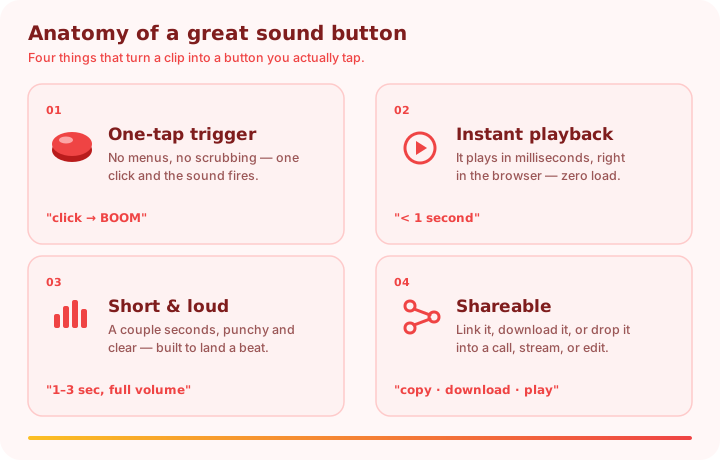
- A one-tap trigger. No menus, no scrubbing — one click and the sound plays. The best sound buttons have a clear label so you know exactly what fires before you press.
- Instant playback. The audio is pre-loaded and plays in milliseconds, right in the browser. A button that makes you wait isn't a button; it's a download.
- A short, loud clip. One to three seconds, punchy and clear, mixed to a consistent volume so it lands a beat instead of getting lost. Long clips belong on a detail page, not a button.
- A shareable result. Every button here can be copied as a link, downloaded as an MP3, or dropped into a call, stream, or edit — so a sound you love doesn't stay stuck on one page.
Types of Sound Buttons on This Board
"Sound buttons" is an umbrella term. The board above mixes several families, and you can jump straight to the ones you want:
| Button type | What's on it | Where to find it |
|---|---|---|
| Meme buttons | Viral clips like the Vine boom and bruh | The Memes & Reactions categories |
| Sound-effect buttons | Airhorns, booms, dings, whooshes, classic SFX | The meme sound effects board |
| Funny buttons | Laugh tracks, rimshots, sad trombones | The funny soundboard |
| Brainrot buttons | Italian brainrot voices and phonk loops | The brainrot soundboard |
| Music buttons | Instrument hits — guitar, piano, cowbell, trumpet | The Music category |
| Discord buttons | Clips you can route into a voice channel | The Discord soundboard |
How to Use the Sound Buttons in 3 Steps
- Open the page. Nothing to install and no account to create — the sound buttons are live the instant the page loads.
- Tap a sound button. It plays immediately in your browser. Tap another to switch instantly — perfect for rapid-fire reactions.
- Search, shuffle, or save. Type a word to filter 825+ buttons, hit Random for a surprise, or open your favorites for your go-to buttons.
The Best Places to Use Sound Buttons
The same sound buttons work everywhere people hang out online — you just pick the moment:
- Discord & voice calls. Fire a reaction the second someone says the magic word. Pair this board with the Discord soundboard to route audio into a channel.
- Twitch & YouTube streams. An airhorn or a boom button punches up a big play. See how to use meme sounds in videos for the audio routing.
- Group chats & screen shares. A well-placed button is a shared punchline — everyone hears the same joke at the same time, no setup needed.
- School or work networks. If sites are blocked, the meme soundboard unblocked page gives you the same buttons.
Sound Button Etiquette: Don't Be the Airhorn Person
Sound buttons are powerful, which makes them very easy to overuse. The difference between "this person is hilarious" and "please mute them" is almost entirely about restraint. The people who are genuinely good with a soundboard treat each button like a punchline, not a background track: they wait for the beat, press once, and let the silence around the sound do the work.
A few habits keep it fun. Match the energy — a tiny aside doesn't need a foghorn. Under-use it — one perfectly-timed button beats ten spammed ones, every time. Read the room — a chaotic gaming server can take a wall of effects, while a work call wants one quiet rimshot at most. And watch for the eye-roll: when people stop reacting, you've hit the point of diminishing returns, so pull back and let the next button surprise them.
A Short History of the Sound Button
The sound button is older than you'd guess. Long before the web, radio DJs and TV producers used "cart machines" — racks of tape cartridges, each loaded with a jingle or effect, fired by a physical button for perfect on-air timing. The whole idea of a soundboard is a descendant of those carts: a grid of instantly-available sounds, each one a press away.
The web turned that hardware into a tab. Early sites in the 2000s let anyone click a button to play a clip, and the format exploded alongside meme culture: the Vine boom, the MLG airhorn, the bruh sound, and a thousand reaction clips all became one-tap buttons that millions instantly recognize. Today a soundboard is just a webpage — but the core idea hasn't changed since the cart machine. A sound button is the shortest possible distance between wanting a sound and hearing it, and that's exactly why the format refuses to die. This page is the modern version: hundreds of sound buttons, all free, all one tap away.
Frequently Asked Questions
What are sound buttons?
Sound buttons are clickable tiles that play a short audio clip instantly when you tap them — meme sounds, reactions, effects, and more, all in your browser with no download.
Are these sound buttons free?
Yes — every button is free to play, with no account, no subscription, and no hidden cost.
Do I need to download anything or sign in?
No. The buttons play instantly in your browser with no app and no login. You can save favorite buttons locally without an account.
Can I use these buttons on Discord, Twitch, or in videos?
Yes — route them through your audio setup for calls and streams, or download a clip and drop it into your editor. For monetized uploads, check each clip's source rights; see our terms.
Can I download a sound button as an MP3?
Yes — every button has a download option that saves a high-quality MP3 to your device, ready for a stream deck or video editor.
Do the sound buttons work on phones?
Yes — the board is fully responsive and tap-friendly on iOS and Android, with the same instant playback as desktop.
That's the whole board: hundreds of fast, free sound buttons ready to play in one tap. Browse categories or open your favorites and start pressing.