
What Is a Scratch Meme Soundboard?
A Scratch meme soundboard is a set of meme sounds you can play with a click — either built as a project on Scratch, or, like this one, a fast web soundboard whose sounds you can download and add to your own Scratch games in a couple of clicks.
Search "scratch meme soundboard" and you'll find two kinds of things: soundboard projects people built on Scratch, and sounds you can use in your Scratch projects. This page does both jobs better. Up top is a real soundboard — tap any of 825+ meme sounds and it plays instantly, no account and no waiting for a heavy project to load. And every sound can be downloaded as an MP3 to use in the games you build yourself.
Scratch is where a huge number of people write their first line of code, and sound is one of the easiest ways to make a project feel alive. A jump that goes "boing", a coin that goes "ding", a game-over screen scored by a sad trombone — those touches turn a simple Scratch game into something people actually want to play and remix. The clips below are picked to do exactly that.
How to Add a Meme Sound to Your Scratch Project (3 Steps)
This is the part most pages skip. Getting a meme sound into Scratch takes about thirty seconds:
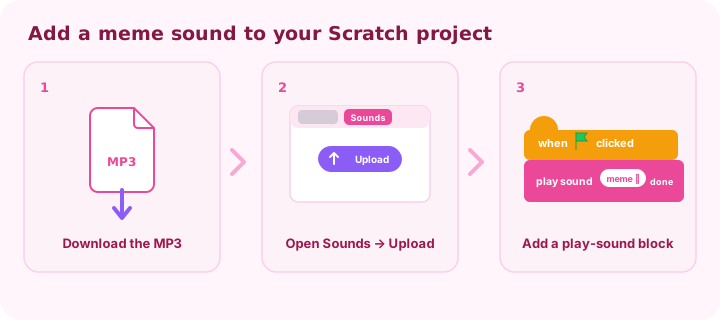
- Download the MP3. Find the sound in the board above, tap to preview it, then hit the download icon to save the file.
- Upload it in Scratch. In the Scratch editor, open the Sounds tab (top-left), hover the Choose a Sound button, and click Upload Sound to pick your MP3.
- Add a play-sound block. Back in the Code tab, drag a play sound [your meme] until done block under a trigger like when 🟢 clicked, when this sprite clicked, or when [space] key pressed.
Common Scratch Blocks for Triggering Sounds
Once a meme sound is uploaded, the trigger block decides when it plays. These are the ones you'll reach for most:
- when 🟢 clicked → play sound. Plays a sound the moment the project starts — good for intros or background loops.
- when this sprite clicked → play sound. The classic soundboard button: click the sprite, hear the meme. Give every button sprite its own sound.
- when [space] key pressed → play sound. Map sounds to keys for a keyboard soundboard or quick reactions during a game.
- when I receive [message] → play sound. Use a broadcast so one sprite can trigger a sound on another — perfect for "player hit", "level up", or "game over" events.
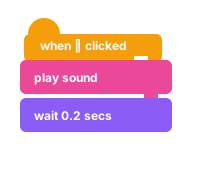
One detail trips up a lot of new creators: play sound starts a clip and immediately runs the next block, while play sound until done waits for the clip to finish before continuing. Use "until done" when the timing matters — like a win jingle before the next scene — and the plain "play sound" block when you want the game to keep moving. If two sounds ever clash, a stop all sounds block clears them, and set volume to ( ) keeps a loud airhorn from drowning out everything else.
Best Meme Sounds for Scratch Games
Half the fun of a Scratch game is the sound design. Here's a quick map of common game events to the meme sounds that fit them — a great starting kit for a platformer, clicker, or obby:
| Game event | Meme sound to use | Why it works |
|---|---|---|
| Jump | Cartoon boing | Bouncy, instantly readable as "up" |
| Collect a coin / score | Ding or "coin" blip | Short and rewarding, good for combos |
| Win / level complete | Airhorn or "hell yeah" | Big payoff for a big moment |
| Game over / lose | Sad trombone (womp womp) | Softens the fail and gets a laugh |
| Take damage / hit | Bruh or "oof" | Deadpan reaction to getting hit |
| Surprise / jumpscare | Vine Boom | Dramatic sting on a sudden reveal |
| Button / menu click | Click or pop | Crisp feedback that the tap registered |
Want the full set to choose from? Browse the meme sound effects library for named classics like the Vine Boom and sad trombone, or browse all categories.
Why a Web Soundboard Beats a Laggy Scratch Project
Soundboard projects on Scratch are fun, but they have real downsides: a big project with hundreds of sounds can take a while to load, the editor is heavy on an old laptop, and remixing one just to hear a clip is a lot of clicks. A plain web soundboard skips all of that — it opens instantly and plays a sound the moment you tap it.
It also matters where you are. Scratch is a school tool, and school networks are strict. This soundboard is a single lightweight page with no plugins or installs, so it tends to load on a school Chromebook even when heavier soundboard apps are blocked — the same reason our meme soundboard unblocked page works on locked-down Wi-Fi. Play here, download what you need, and build in Scratch.
Tips to Make Your Own Scratch Meme Soundboard Stand Out
If you're building your own soundboard as a Scratch project, a few choices separate the ones that get remixed from the ones that get scrolled past:
- Curate, don't dump. Twenty great meme sounds people recognize beat two hundred random ones. Pick the hits.
- Make the buttons sprites. Give each sound a custom sprite or costume, and swap the costume on click so the button visibly reacts when it's pressed.
- Lay it out on a grid. Even spacing and clear labels make a soundboard feel like a real app instead of a pile of buttons.
- Share and invite remixes. Scratch is a community — a clean, well-labeled project gets remixed, and remixes bring more players back to yours.
Can I Use These Sounds in My Scratch Project?
For personal and learning projects — the vast majority of Scratch — yes, go for it. Download the meme sounds, add them to your game, and share it. It's good manners to credit the original creators of a clip in your project notes when you can, and it fits right into Scratch's share-and-remix culture.
The one thing to keep in mind: some meme sounds started as clips from songs, shows, or movies, so the underlying audio can still carry someone else's rights. That's rarely an issue for a school project, but if you ever take a game commercial, check the source of each sound first. Our terms of use explain how we host these clips.
Do You Need to Code to Use a Meme Soundboard on Scratch?
Not at all — and that's the best part. To simply play meme sounds, you don't touch Scratch at all: open this page and click. To add a sound to your own Scratch project, you need just one block — a single play sound under a trigger — which is usually the very first thing new coders learn. Sound is a friendly on-ramp: a beginner can drop a meme into a sprite, hear it work, and suddenly Scratch feels less like homework and more like a toy.
From there it grows naturally. Once a kid sees one sound play on click, they want a second sprite, a keyboard shortcut, a win jingle — and each of those is one more small block. A meme soundboard is one of the gentlest ways into real coding, which is exactly why so many first Scratch projects are soundboards.
Frequently Asked Questions
What is a Scratch meme soundboard?
It's a soundboard of meme sounds you play with a click — either a project built on Scratch, or a web board like this one whose sounds you can download and add to your own Scratch games.
Can I use these meme sounds in my own Scratch project?
Yes — download any sound as an MP3 and upload it in Scratch's Sounds tab. It's free and perfect for personal and school projects.
How do I add a sound to Scratch?
Open the Sounds tab, click Upload Sound and pick your MP3, then drag a "play sound until done" block under a trigger like "when 🟢 clicked" — see the three-step guide above.
Is the soundboard free? Do I need an account?
It's completely free with no account and nothing to install — just open the page and tap a button to play.
Will it work on a school Chromebook?
In most cases, yes. It's a lightweight static page with no plugins, so it loads where heavier apps get blocked — the same approach as our unblocked soundboard.
Can I download the meme sounds as MP3?
Yes — every sound has a one-click MP3 download, ready to drop into Scratch or any other editor.
That's the workflow: play here, grab the MP3, and build it into your game. The fastest Scratch meme soundboard is the one that loads instantly and follows you into your project. Browse categories or open your favorites to start.